
Into a Hearth Yonder
Lead World Designer
2023 – 2025
GAME INFO
Genre: Adventure Crafting Game
Status: In development
Engine: Unreal Engine 5
RESPONSIBILITIES
-
Co-led a 12-person World Team in collaboration with Lead Level Artist, created world design rules, and built a 16km² open world map with dynamic biomes
-
Established traversal metrics and exploration flow principles
-
Assisted Narrative designers in visualizing and communicating worldbuilding
-
Deployed UE5 PCG to populate resources, reducing manual distribution work
-
Migrated to UE5 World Partition, removing landscape-merge overhead
-
Built editor tools to improve workflows and cross-team communication
As Lead Level Designer, I managed a team of 4 Level Designers to build a large open-world with dynamic biomes and free-form gameplay, working closely with 8 Level Artists and their Lead. I defined player flow across a 16 km² map, oversaw the design of quests, activities, and exploration content, and led the transition to Unreal Engine 5 World Partition and PCG procedural systems. I developed in-editor tools to streamline workflows, maintained core design documentation, and ensured production transparency through structured planning, Jira dashboards, and regular team feedback.


Creating an Open World
Defining the world progression principles through tiers and regions

Defining the World
Mapping the player flow through the world via Regions, Towns, Landmarks

Categorizing player gameplay and thier placement principles around POI

Desginging player flow principles through roads and gameplay
.png)
Designing Structure
Paper Design of a Biome
Establishing Flow and Metrics
Paper Design of a Biome

Drafting landscape in Gaea

Blockout of landscape and regions inside
Unreal Engine 5

Detail design of gamplay types and overall flow around a Biomes regions

Analyzing player flow on the local level

Outlining possible variations in player movement and exploration flow
_edited.jpg)
Setting clear level design boundaries for challenge and progression

Establishing flexible guidelines for player movement through the game environment

Crafting Gameplay
Organizing Landmarks
Detail the blockouts of regions

Drafting gameplay, detail player paths and roads

Requasting concept art for finilizing atmosphere and mood of a biome

Navigating the set dressing of the environment with Level Art team

Draft blockout and identifying principles for Landmarks

Detailing Landmarks blockout and their influence on open-world player flow

Requasting concept art for finilizing atmosphere and mood of a landmark

Finalizing Landmark feel and set dressing

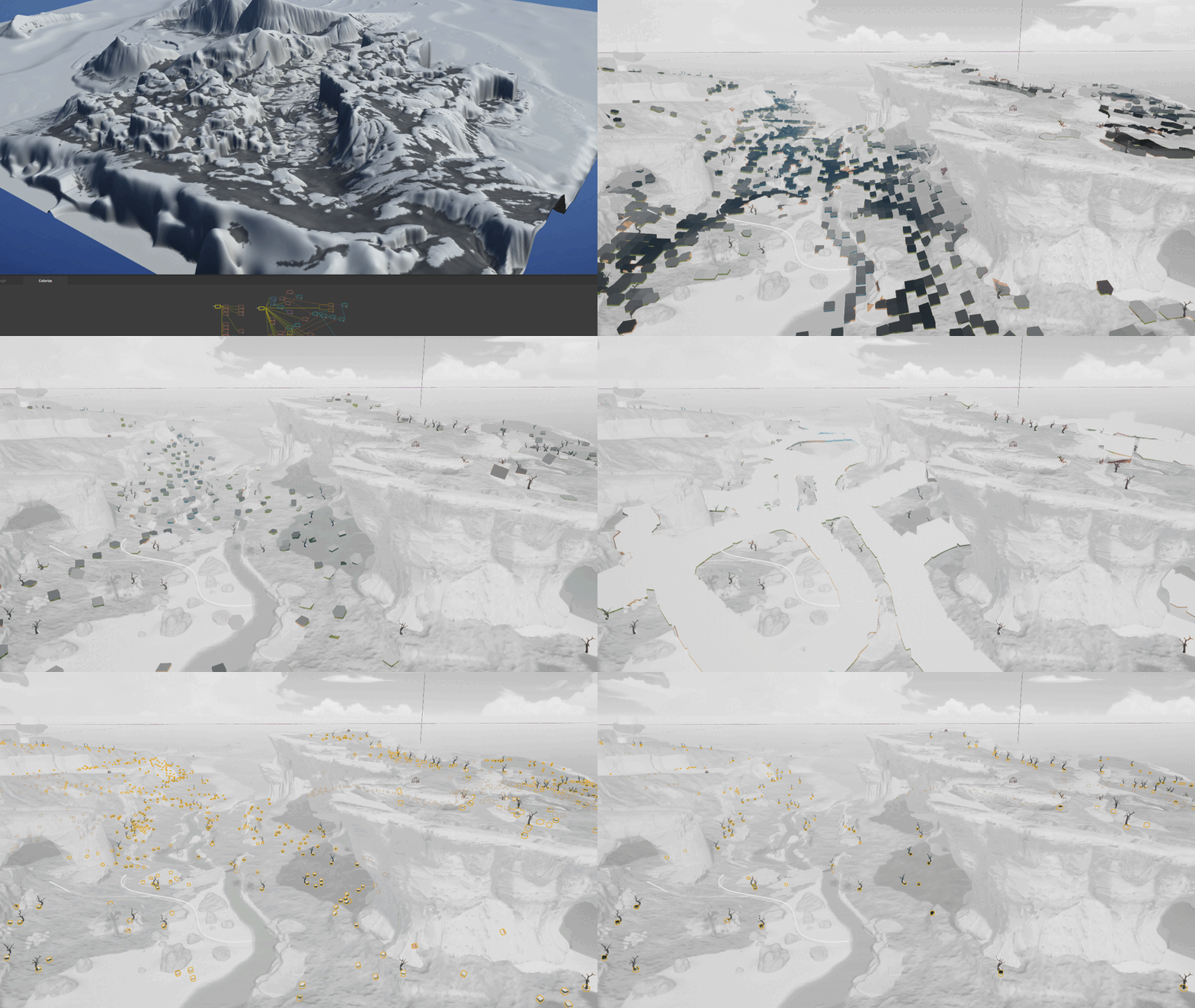
PCG Resource destribution
Created a PCG system for procedural population of Biomes with different types of resources
Key Features:
-
Adjusts for terrain (type and form) and mesh collisions
-
Adjusts for roads and rivers
-
Different types of resources either avoide roads/rivers or clamp around them
-
-
The system adjusts spawning rules for the desired amount of resources set by the Designer
-
One click update!
-
Stored in a Level Instance - can be hidden easily
-
Modular graph approach - easily adjustable
Unreal Engine Tools
On the project, I oversee the effectiveness of the World Design Team and always try to enhance either game mechanics given by programmers to be more user-friendly or create my own helpful tools for better communication through the editor by making valuable guidelines.
Player activity guideline
A guideline tool I use to mark player interactions with the world, mainly for communicating gameplay to Level Artist. I can show different gameplay activities we desire from the player and also markup viewpoints with a point chooser and the ability to check
view blockers
Select overlapping actors
It was extremely simple but saved a ton of our team time when we needed to move large compositions around the big map, especially when others forgot to combine them in groups or level instances. The tool does what it says: it can multi-select actors overlapping with already selected ones and has a radius scaler
Player path guideline
Spline has options for visualizing three path types I use to showcase player navigation. The tool can switch between paths, copy spline points from other splines, reset pivot point, and even optimize itself if it becomes too long. I also feed these guideline paths into PCG logic for gameplay element distribution.
Objects along spline
We have an escort activity that is made with a spline. The gameplay presumes to have checkpoints along the path and a reward at the end. I've made a prototype tool for programmers to showcase how we want this mechanic to behave for faster implementation of multiple gameplay elements in the level